These are the controller bindings defined in the OpenComposite Unleashed preset Vanilla + Oculus Touch, which originates from the Optimized Button Layout for Oculus and Meta controllers mod.
Despite the “Vanilla +” label in OCU, it is far more similar to the VRIK bindings than it is to the vanilla bindings.
This control scheme sets all of the face buttons (A / B / X / Y) to hotkeys. That allows you to set them to a wide variety of actions, including mod-specific functions (VRIK Gestures, DovaVR Locomotion, SkyrimNet, OBody, etc.).
It also lets both grip buttons do double-duty as modifier keys (like shift or function), so they can be combined with other buttons to perform additional actions. Notably,  Left grip +
  Left trigger is assigned to Shout / Power, which conflicts with the default bindings for Spell Wheel VR (so you’ll likely want to change one or the other). Check out the Nexus page for full details.
This scheme is unusual in that it makes a number of changes to menu bindings, such as assigning  A to Select / Use and assigning
  B to Back / Cancel / Exit.
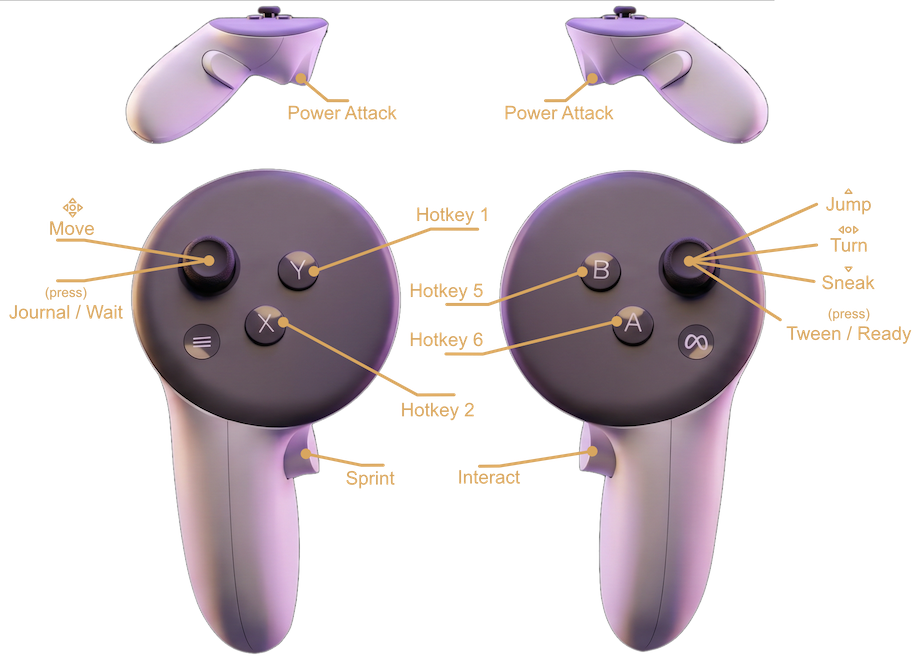
For Valve Index controllers, the actions are assigned to the buttons that are in the same positions as the ones shown above, though they have different labels on the Index controllers.
Gameplay
| Action | Oculus Left | Oculus Right |
|---|---|---|
| Move |  Left stick Left stick | — |
| Turn | — |  Right stick Right stick |
| Jump | — | Right stick ↑ |
| Sneak | — | Right stick ↓ |
| Cast Magic | Left trigger |  Right trigger Right trigger |
| Draw/Nock Arrow | — | Right trigger |
| Power Attack | Left trigger (hold + swing) | Right trigger (hold + swing) |
| Interact (Activate) | — |  Right grip Right grip |
| Sprint | Left grip | — |
| Shout | Left grip + Left trigger | — |
| Tween / Ready Weapon | Right stick (press / hold) | — |
| Journal / Wait | Left stick (press / hold) | — |
| Hotkey 1 |  Y Y | — |
| Hotkey 2 |  X X | — |
| Hotkey 3 | Left grip + Y | — |
| Hotkey 4 | Left grip + X | — |
| Hotkey 5 | — | B |
| Hotkey 6 | — | A |
| Hotkey 7 | — | Right grip + B |
| Hotkey 7 | — | Right grip + A |
Menus
| Action | Oculus Left | Oculus Right |
|---|---|---|
| Accept | Left trigger | A / Right trigger |
| Back / Cancel / Exit | — | B |
| Previous Menu (Journal) | Left trigger | — |
| Next Menu (Journal) | — | Right trigger |
| Equip Right | — | Right trigger |
| Equip Left | Left trigger | — |
| Select / Use Item | — | A |
| Favorite Item | — | Right stick (press) |
| Item Zoom | — | Right grip |
| Filter (SkyUI) | — | — |
| X Button | X | — |
| Y Button | Y | - |
Loot Menu
| Action | Oculus Left | Oculus Right |
|---|---|---|
| Take Item | — | A |
| Take All Items | X | — |